

Build, test & launch experiments with git
VS Code, Vim, Sublime, R Studio? Your team can run experiments with their favourite tools

Manage experiments with Mojito Console. It is currently in closed beta; message us for access.
VS Code, Vim, Sublime, R Studio? Your team can run experiments with their favourite tools

Keep your site fast with a split testing library that's an order of magnitude smaller than SaaS solutions

Protect your users & applications from bugs with gradual ramp-up, error tracking & error handling

Launch experiments from your CLI or CI tools into environments you control
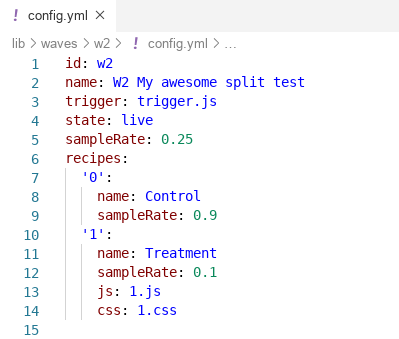
Keep your experiment config in one place so you can perform effective code review & QA over git. Read our test object schema.

Accelerate your test launch velocity & free your experimentation program from your monolithic web application deployments.
Any errors thrown from tests will fire events so you can track & handle problems before they hurt the user experience.


Keep your application secure from 3rd party scripts & trackers. Avoid those "surprise" updates to your split testing container & stop your users' PII data from leaking to prying eyes.
Switching to Mojito from a SaaS tool can reduce page load times because it's an order of magnitude lighter and can be served from your own domain. * Tested 2019-05-07


Build custom HTML reports using all data in your data warehouse. Plus, you can keep your experiment results even if you decide to decide to change testing tools.
You'll need Node and npm installed.
# Download Mojito JS Delivery
git clone https://github.com/mint-metrics/mojito-js-delivery.git
cd mojito-js-delivery
npm install

# Create your first test
npm run new -- --demo w1
npm run set -- live --waveId w1

# Build your container into dist/mojito.js
npm run build